
If you use Microsoft Dynamics 365 Business Central, you’ll notice some important changes this year in how the system handles Form 1099s. With the latest release (V27.0), Microsoft updated the way 1099 information is tracked, stored and submitted — and these changes have real implications for how you prepare for year-end.
To help you stay on top of things, we’re walking through the five key updates you should know as you get ready for 2025 reporting.
1. IRS Reporting Periods Now Require Annual Setup
Business Central now requires you to set up a new IRS reporting period every year. During the upgrade, your 2025 reporting period and vendor data were automatically migrated. Moving forward, you’ll need to repeat this setup annually to ensure accurate 1099 tracking.

Helpful tip: Use Copy Setup Form on the IRS Reporting Periods page to quickly create a new year based on last year’s configuration. This copies your forms, form boxes, vendor setup and more.
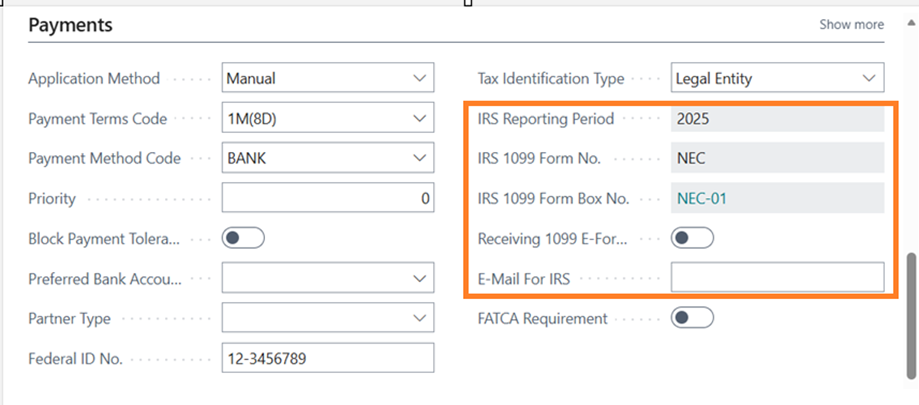
After creating the new period, make sure you review your vendor cards to confirm:
- Assigned Reporting Period
- IRS 1099 Form No.
- IRS Form Box No.
- Receiving 1099 E-Form (be sure you have vendor consent)
- E-Mail For IRS (where the vendor will receive their form)
2. New Vendors Must be Assigned to the Correct Reporting Period
When adding a new vendor, Business Central will not assign 1099 details automatically. You’ll need to manually set up their 1099 information, so payments are tracked correctly for the year.
To assign a vendor to the correct 1099 setup:
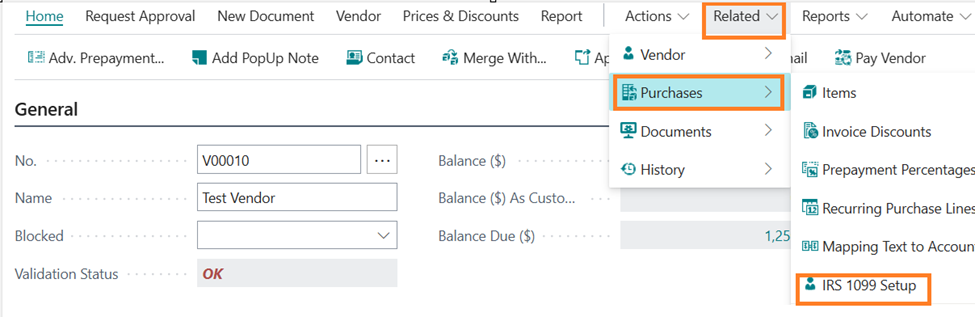
- Go to the Related
- Select Purchases
- Choose IRS 1099 Setup
- Open IRS 1099 Vendor Form Box Setup
- Assign Period No., Form No. and Form Box No.
This ensures new vendors won’t fall through the cracks at year-end.

3. Automatic Upgrades Only Cover the Current Reporting Year
Business Central only auto-upgraded 1099 data for the 2025 reporting year. Anything prior to 2025 must be migrated manually to avoid performance issues associated with large data sets.
If you still need 1099 reporting for earlier years, you’ll want to upgrade those periods yourself within the application.
4. Tracking Data for Reporting Requires the Correct Posting Dates
Business Central will only enable IRS-related fields when the Posting Date of the document falls within your configured reporting period.
If fields appear blank or disabled, check two things:
- The posting date falls within the IRS reporting period you created
- The vendor is marked as 1099-eligible for that period
This is one of the most common issues users run into — and it’s an easy fix once you know what to look for.
5. Submitting 1099s Still Follows Business Central’s Standard Workflow
Once your reporting periods and vendor setups are in place, you can use Business Central’s familiar reporting tools to:
- Review 1099 data
- Generate IRS forms
- Submit electronic filings
Business Central’s standard workflow hasn’t changed, but the setup leading into it has.
Need Help?
Microsoft’s latest 1099 enhancements bring more structure to annual reporting, but they also require more upfront setup. Taking time now to confirm your IRS reporting periods, vendor configurations and historical data upgrades will save you a lot of time (and frustration) during year-end close.
Contact us here or call 800.899.4623 if you need help preparing your system or reviewing your 1099 setup.